Interactive TUI
Krayne ships with a k9s-style interactive terminal UI for managing Ray clusters without memorizing CLI commands.
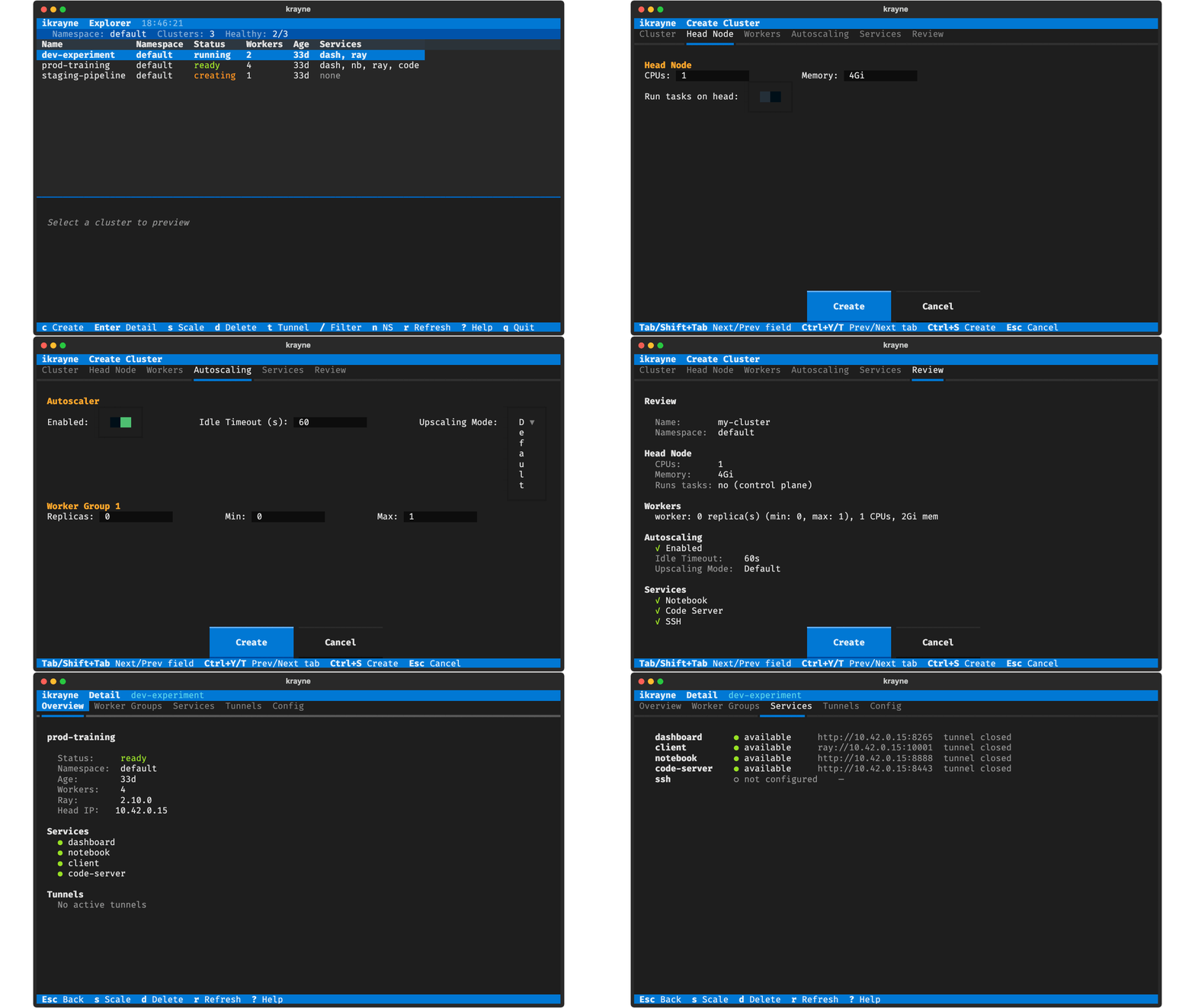
Launch
It opens directly into the cluster list view.
Keybindings
| Key | Action |
|---|---|
c |
Create a new cluster |
Enter |
View cluster details |
s |
Scale selected cluster |
d |
Delete selected cluster |
t |
Toggle tunnel open/close |
/ |
Filter clusters by name |
n |
Switch namespace |
r |
Refresh cluster list |
q |
Quit / Back |
? |
Show help overlay |
Esc |
Close dialog / Go back |
Screens
Cluster List
The default view shows all clusters in the current namespace as a table with color-coded statuses:
- Green —
ready,running - Yellow —
creating,pods-pending,containers-creating - Red —
image-pull-error,crash-loop,unschedulable,pods-failed
The list auto-refreshes every 5 seconds. Press r for an immediate refresh.
Create Cluster
Press c to open a prefilled form with all default values from the cluster configuration:
- Cluster — name (required), namespace
- Head Node — CPUs (
1), memory (4Gi), and a "Run tasks on head" toggle (off by default — head GPUs are intentionally not exposed) - Worker Group — name (
worker), CPUs (1), memory (2Gi), GPUs (0) - Autoscaling — per-group replicas (
0), min replicas (0), max replicas (1) - Services — Notebook, code-server, SSH (all enabled by default)
Modify any values and press Ctrl+S or click Create to submit. Validation errors are shown inline.
Cluster Details
Press Enter on any cluster to see its full details: head node resources, worker groups, active tunnels, and service URLs.
From the detail view you can also scale (s), delete (d), or toggle tunnels (t).
Scale
Press s to open a scale dialog that shows the current worker group and replica count. Enter a new value and press Enter.
Delete
Press d to open a confirmation dialog. The cancel button is focused by default to prevent accidental deletions. Confirming stops any active tunnels before deleting the cluster.
Tunnels
Press t to toggle port-forward tunnels for the selected cluster. If tunnels are active they are closed; otherwise new tunnels are opened for all detected services (dashboard, client, notebook, code-server, SSH).