Creating Clusters
This guide covers all the ways to create Ray clusters with Krayne — from a single command to complex multi-worker GPU configurations.
Basic creation
The simplest way to create a cluster:
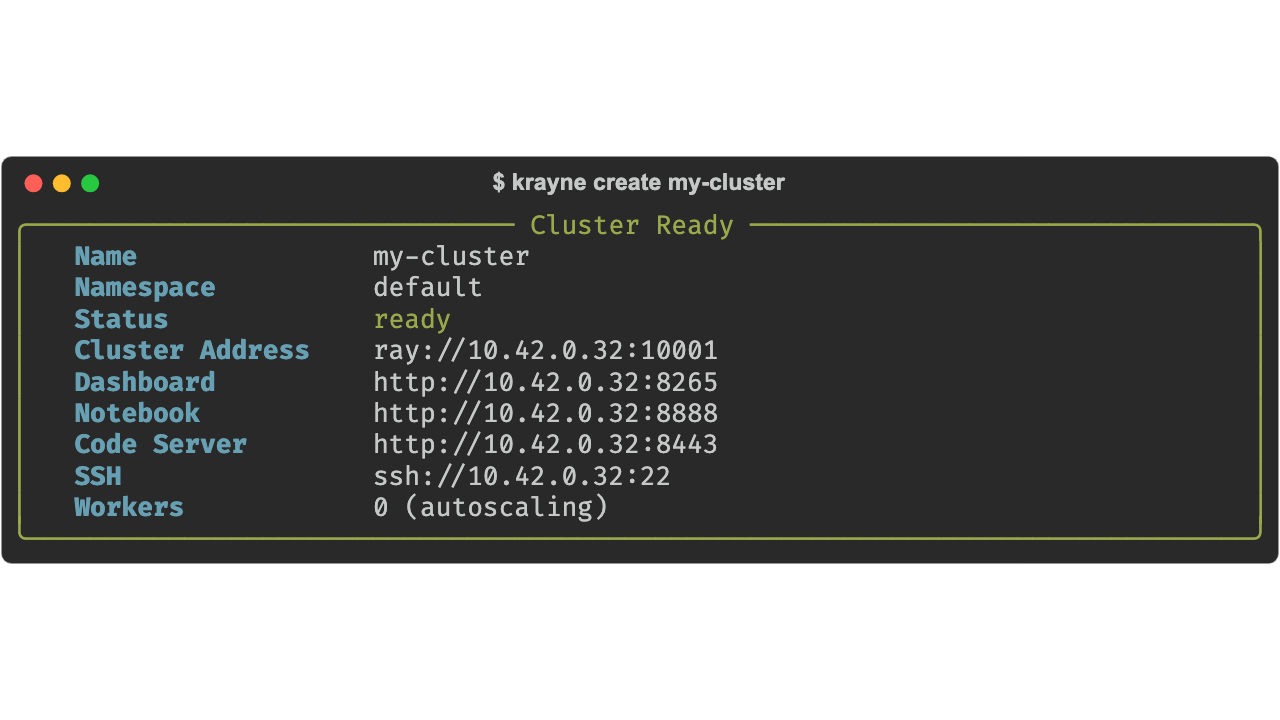
The default cluster includes:
- Head node: 1 CPU, 4 Gi memory, no GPUs (control plane only — Ray
num-cpus=0) - 1 worker group: autoscaling 0–1 workers (0 initial), 1 CPU, 2 Gi memory per worker
- Autoscaling: enabled (KubeRay in-tree autoscaler)
- Services: Jupyter notebook, code-server, and SSH enabled
Autoscaling clusters
By default, clusters have autoscaling enabled. Control worker scaling bounds:
# Scale between 0 and 10 workers, start with 2
krayne create my-cluster --min-workers 0 --max-workers 10 --workers 2

# Disable autoscaling entirely (fixed replica count)
krayne create my-cluster --no-autoscaling --workers 4
from krayne.config import ClusterConfig, WorkerGroupConfig, AutoscalerConfig

# Autoscaling with custom bounds
config = ClusterConfig(
    name="auto-cluster",
    worker_groups=[
        WorkerGroupConfig(replicas=2, min_replicas=0, max_replicas=10),
    ],
)

# Fixed replicas (no autoscaling)
config = ClusterConfig(
    name="static-cluster",
    autoscaler=AutoscalerConfig(enabled=False),
    worker_groups=[
        WorkerGroupConfig(replicas=4, min_replicas=4, max_replicas=4),
    ],
)
GPU clusters
Add GPUs to workers with CLI flags:
This creates 2 workers, each requesting 1 GPU via the nvidia.com/gpu resource. To schedule on specific GPU models, label your nodes yourself and add a nodeSelector via a custom manifest — krayne does not emit cloud- or accelerator-specific selectors.
Custom resources
Override head and worker resources:
Using a YAML config file
For complex configurations — multiple worker groups, custom images, specific services — use a YAML file:
name: my-experiment
namespace: ml-team
head:
  cpus: 8
  memory: 32Gi
worker_groups:
  - name: cpu-workers
    replicas: 4
    cpus: 15
    memory: 48Gi
  - name: gpu-workers
    replicas: 2
    gpus: 1
    image: rayproject/ray:2.41.0-gpu
services:
  notebook: true
  code_server: true
CLI flags override YAML
When both a YAML file and CLI flags are provided, CLI flags take precedence:
Using the Python SDK
The SDK provides the same functionality for use in scripts, notebooks, and pipelines:
from krayne.api import create_cluster
from krayne.config import ClusterConfig, WorkerGroupConfig

# Simple cluster
config = ClusterConfig(name="sdk-cluster")
info = create_cluster(config, wait=True)
print(f"Dashboard: {info.dashboard_url}")

# GPU cluster with multiple worker groups
config = ClusterConfig(
    name="training-run",
    namespace="ml-team",
    worker_groups=[
        WorkerGroupConfig(name="cpu-workers", replicas=4),
        WorkerGroupConfig(
            name="gpu-workers",
            replicas=2,
            gpus=1,
        ),
    ],
)
info = create_cluster(config, wait=True, timeout=600)
Loading from YAML
from krayne.api import create_cluster
from krayne.config import load_config_from_yaml

# Basic load
config = load_config_from_yaml("cluster.yaml")

# With overrides (supports dot-notation for nested fields)
config = load_config_from_yaml(
    "cluster.yaml",
    overrides={"namespace": "staging", "head.cpus": 32},
)

info = create_cluster(config, wait=True)
Specifying a namespace
By default, clusters are created in the default namespace:
Warning
The namespace must already exist in Kubernetes. Krayne raises NamespaceNotFoundError if it doesn't.
What's next
- Managing Clusters — list, describe, scale, and delete clusters
- Configuration — full config model, defaults, and YAML schema
- CLI Reference — complete
krayne createflag documentation